AI quality check
The AI quality check is an automatic diagnosis of your course based on five didactic dimensions. Within up to 30 seconds you get an overall score plus concrete improvement recommendations — ideal as a sanity check before activation or when completion rates are low.
What the check evaluates
Five dimensions, each with its own score from 0-100:
| Dimension | What is checked |
|---|---|
| Completeness | Is all essential content there? Are there obvious gaps? |
| Structure | Is the setup logical? Is there a sensible common thread? |
| Content | Is the content professionally relevant, up to date and suited to the target group? |
| Learning objectives | Are the learning objectives clear and verifiable? |
| Difficulty level | Does the level match the declared target group? |
The five dimensions produce an overall score of 0-100 with color coding:
- 75-100 — good quality
- 50-74 — room for improvement
- 0-49 — considerable room for improvement
Starting the check
- Find your course in Course management (Administration → Course management → Catalog).
- On the course card, click the light-bulb icon ("AI quality check") — or, if a score already exists, click the score chip directly.
- In the dialog, click Check now — or Check again if results already exist.
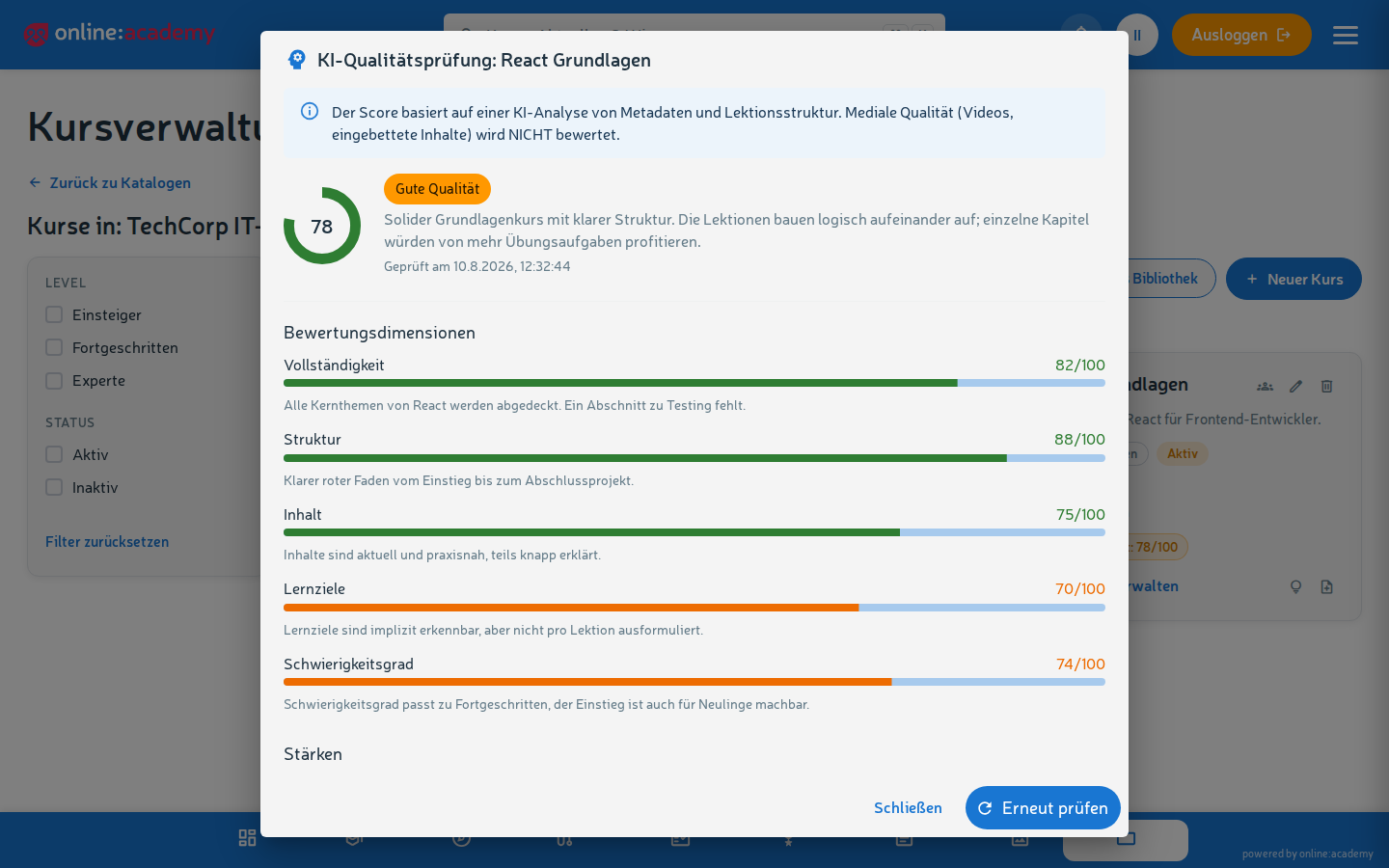
While the analysis runs, a loading indicator appears ("AI is analyzing the course…"). If you close the dialog, the analysis is not aborted server-side — but the value only updates the next time you open it.
Understanding the results
In the dialog you see:
- Overall score as a doughnut chart + date of the last check
- Dimension bars with a score and individual feedback per dimension
- Strengths — a list of what works particularly well (a plus for your course!)
- Recommendations — concrete suggested actions, e.g. "add quizzes to check knowledge" or "formulate the learning objectives in lesson 3 more precisely"
What the check does NOT evaluate
The check analyzes the metadata and structure of the course — course title, description, difficulty level, lesson titles and lesson types. It does not look at the media quality of your content: videos, embedded H5P content, PDF attachments are not evaluated for their content. Judging media quality remains editorial — the AI is a tool here, not a replacement.
When a check is worthwhile
- Before activation — a final sanity check that the structure and coverage are right
- After major content changes — a new block of lessons, adjusted learning objectives, added quizzes
- At low completion rates or poor learner ratings — as a diagnostic tool for what might be causing it
- Before an annual refresh — does the difficulty still match the target group?
You can restart the check at any time. Just note the shared limit across all AI features (tutor, AI grading, quality check): at most 30 AI calls per 5 minutes per person — in everyday use this doesn't matter.
Interpreting concrete recommendations
Examples and how to deal with them:
| Recommendation | What you can do |
|---|---|
| "Formulate learning objectives more precisely" | Reconsider: what should learners concretely be able to do after the course? At most 3-5 clear sentences in the description. |
| "Add more knowledge checks" | Insert quiz lesson(s) between longer stretches of explanation. See Quizzes and grading. |
| "Review the difficulty progression" | Are the first lessons really for beginners? Or do you jump into detail too quickly? |
| "Common thread unclear" | Check the lesson order, perhaps add a transitional text between topics. |
| "Estimated duration seems too short/too long" | Play through it yourself or ask a test learning group how long they actually need. |
Frequently asked questions
The check gives me a low score, but my learners are satisfied. Both views are valid — the AI evaluates didactic structure, your learners evaluate practical usefulness. If the course works in practice, the AI recommendations are an optional improvement, not a must.
How often should I check? During the creation phase, a few times, with a new check after each adjustment. In live operation, at most every few months. Frequent re-checks without changes deliver almost identical results.
My course has very different scores across several dimensions — what should I do? Focus on the lowest scores first — that's where you get the biggest gain per effort. Don't ignore the high scores, but setting priorities is the fastest route to a noticeable quality improvement.
The AI gives me recommendations I think are wrong. You know your course and your learners better than the AI. See recommendations as suggestions, not instructions. If a recommendation seems wrong to you, skip it.
Do learners see the score? No — the quality score only appears in course management and the trainer area, not in the learners' catalog or course player.