Assembling learning paths
A learning path is a curated sequence of several courses — from fundamentals through advanced topics to specialized subjects. Learning paths structure complex topic areas into a coherent learning journey that learners can enroll in with one click.
Learning paths can be created and maintained by content managers and company admins — as a pure trainer you don't see the management area. If needed, you can submit suggestions for learning paths via your content manager.
When a learning path makes sense
- You have several related courses that learners should sensibly take not individually but as a package
- There's a clear learning journey from entry to deep understanding
- Learners should be able to enroll in a whole learning sequence with one click
Examples:
- "Certified Project Manager" — 5 courses: Fundamentals → Tools → Soft skills → Risk → Final exam
- "Sales onboarding" — 4 courses: Company values → Products → CRM tool → First 90 days
- "Data literacy" — 6 courses: Statistics basics → Data visualization → SQL → Pandas → Storytelling → Exercise
Creating a learning path
- In the main menu, go to Administration → Manage learning paths.
- Click Create.
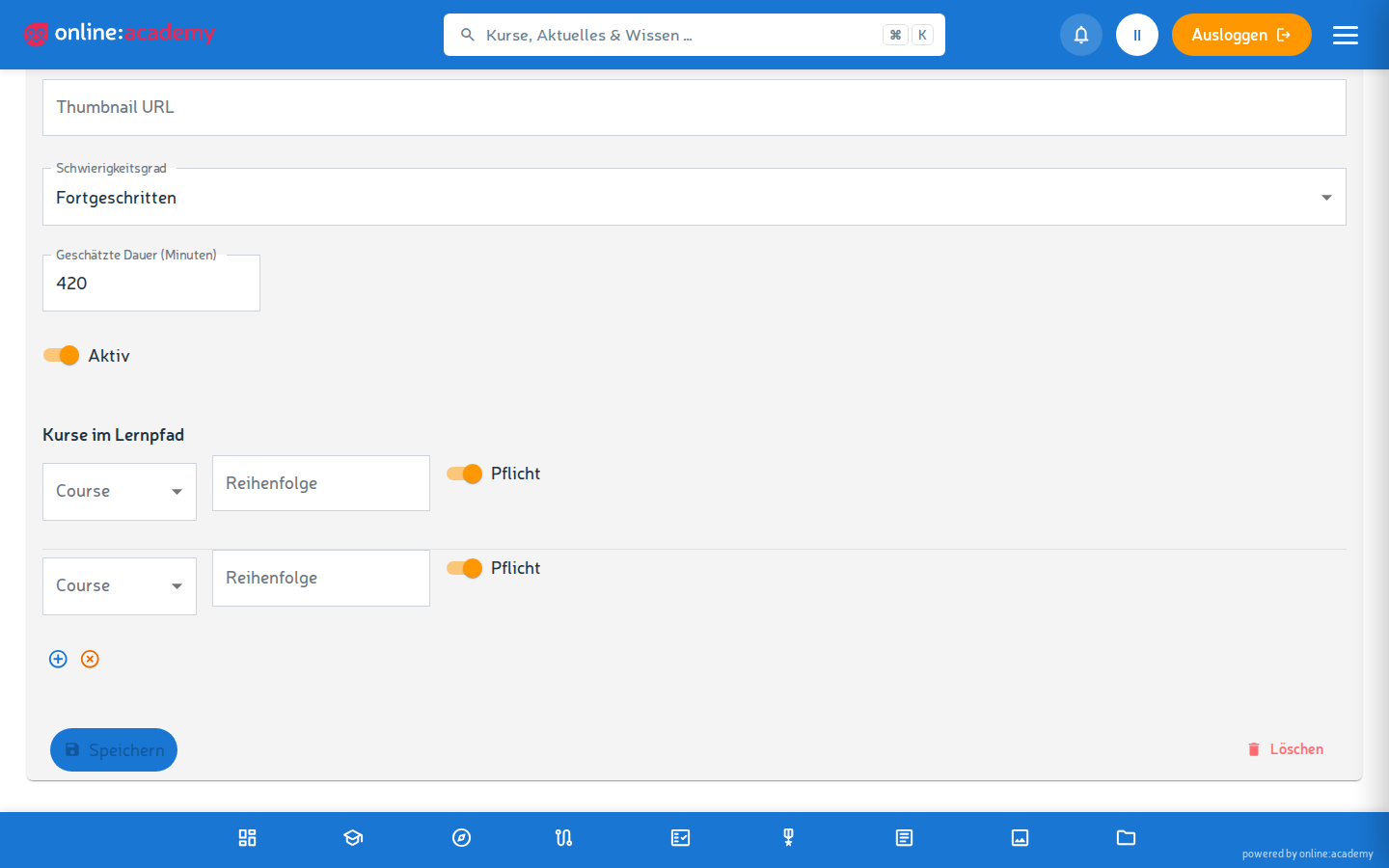
- Fill in the fields:
- Title and description
- Difficulty level (Beginner / Advanced / Expert)
- Estimated duration
- Optional: Thumbnail URL — link to a preview image
- Active toggle — controls visibility for learners
- Save — the learning path is created but still empty.
- Open the saved learning path again: there is now a Courses in the learning path section — assign courses there, reorder them with the arrow buttons, and remove them again if needed.
The order is a recommendation
The order of the courses structures the learning journey and is shown to learners that way — it is not technically enforced: anyone enrolled in the path can start any of its courses directly. Word the path description accordingly ("please work through in order") if the sequence matters to you.
Active vs. inactive
- Inactive: the path doesn't appear in the learners' learning-path directory, and new enrollments are blocked. In the administration area, everyone with the right permissions in your company can still see it.
- Active: appears in the learning-path directory, all eligible users can enroll.
You can switch between the two statuses without already enrolled learners losing their access.
Adding or removing courses later
Updates to the learning path — inserting new courses, removing old ones — also affect already enrolled learners:
- Removing a course — the progress of everyone enrolled is recalculated; the course itself and its progress remain available to learners outside the path.
- Adding a course — learners see the new course as an additional station to complete. Anyone who had already completed the path may fall back to "in progress" as a result.
- Reordering — only changes the display order; progress is unaffected.
Better to make major overhauls rarely and with an announcement to all active enrollments.
Enrolling learners in the learning path
Two options:
- Learners enroll themselves — if your learning path is active and the enrollment mode allows it (analogous to courses: self-enrollment, on request, or no self-enrollment).
- Assign the learning path as a mandatory assignment — see the box below.
The learning-path enrollment itself does not automatically enroll learners in the included courses — learners start the courses from the path view. Only via the mandatory-assignment route are the path's mandatory courses enrolled automatically.
Learning path as a mandatory assignment
You can assign a whole learning path as a mandatory assignment with a due date. In this case the person is automatically enrolled in the path's mandatory courses; the assignment is fulfilled once the path is completed.
Learners' view of a learning path
Under My learning paths, learners see:
- overall progress of the path
- which courses are included and which are already completed
A more detailed description is in the learner docs — not further relevant to your configuration.
Frequently asked questions
Can I use a course in several learning paths at once? Yes — a course can be assigned to as many learning paths as you like. Learners who have completed the course get it counted as completed in every path.
Can I nest learning paths (a path within a path)? Currently not — a learning path contains courses, not sub-paths. If you want a longer learning journey, build it as one large learning path with many courses.
How do I see how far along everyone is in the learning path? There is currently no dedicated learning-path report. Workaround: under Administration → Analytics & Reports, look at the progress of the path's individual courses (Course details tab).
Do learners get a certificate for completing the learning path? No — certificates are issued per course (if enabled on the course). A dedicated learning-path certificate doesn't exist; learners collect the certificates of the included courses.
Can I delete a learning path when there are already people in it? Only company admins can delete. The individual course enrollments and progress remain; only the path container disappears.