Using the AI Tutor
The AI Tutor is a learning assistant that answers your questions about the current lesson — it provides explanations at the push of a button, shows examples, generates practice quizzes, or gives you a summary. It knows the content of your lesson and can support you in a targeted way.
The AI Tutor is not available in every course — your trainer decides per course, and even per lesson, whether it is active.
Opening the tutor
- Open a lesson in the course player.
- Open the right-hand drawer (arrow or tutor icon).
- Select the Tutor tab — the chat window appears.
If the tab is missing, the tutor is not enabled for this lesson or this course.
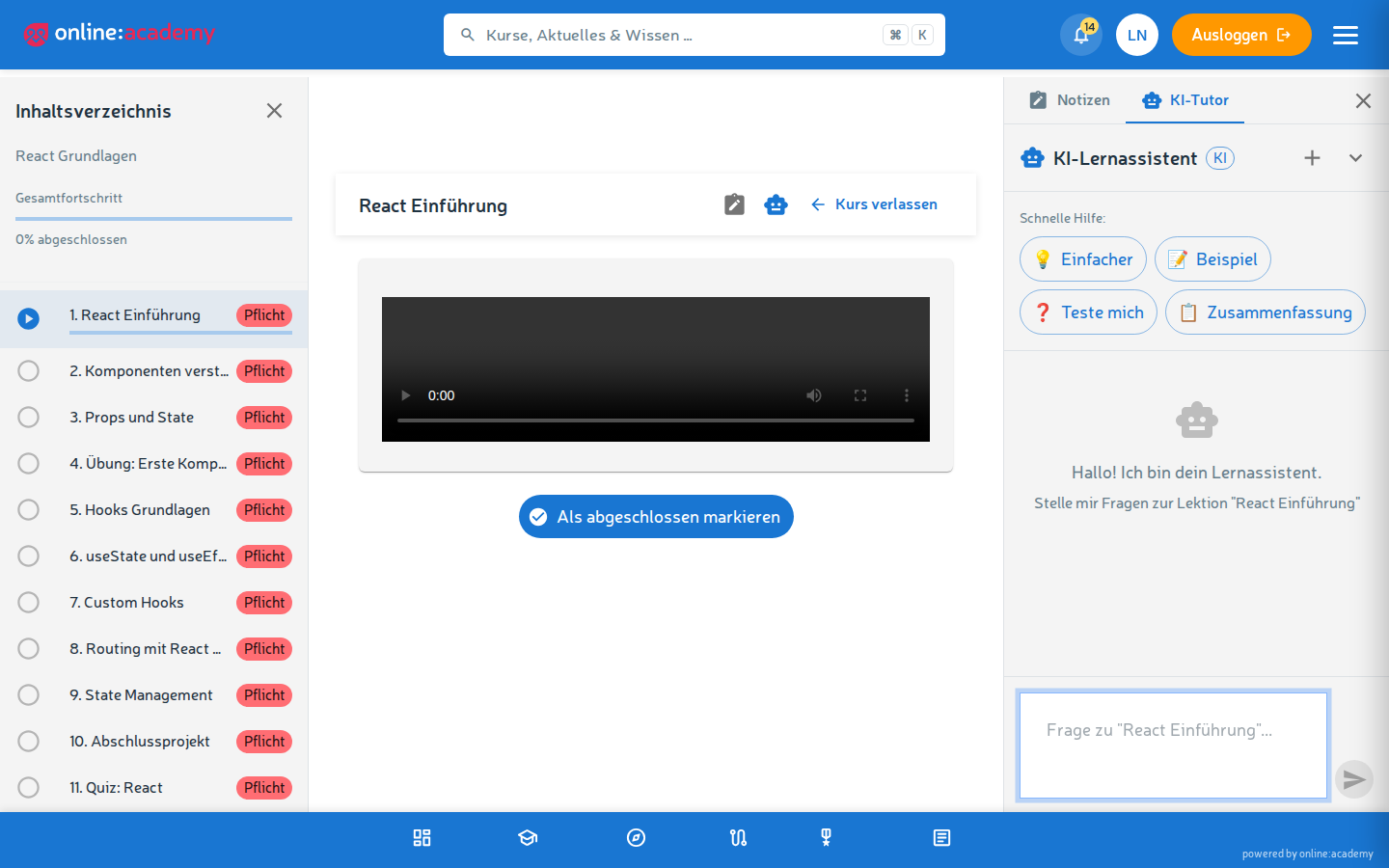
Asking a question
Type your question into the input field and press Enter. Use Shift+Enter to insert a line break.
- Answers usually arrive within a few seconds
- Texts are displayed formatted — headings, lists, code examples
- Answers can contain several paragraphs and examples
The tutor remembers what came before in the current conversation. You can ask follow-up questions like "can you explain that differently?" or "give me another example" — it refers back to the previous one.
Quick-help buttons
Below the chat window you see four buttons with the most common help requests:
| Button | What the tutor does |
|---|---|
| Explain more simply | A different, easier explanation of the lesson content |
| Example | A practical example matching the lesson topic |
| Test me | A short quiz with 2-3 questions for self-assessment |
| Summary | A brief summary of the key points |
These buttons are often more helpful than a self-formulated question, because they are tailored exactly to the current lesson.
Finding earlier conversations again
In the chat window, click the History button at the top — all of your previous tutor conversations appear, sorted by "last modified". The title is automatically the beginning of your first question.
- A click reopens the conversation
- You can keep asking questions within the old conversation
- You can delete individual conversations if you no longer need them
What the tutor does not do
It doesn't reveal quiz answers. For a quiz question from the course, the tutor deliberately gives no direct solution — it's meant to support your learning, not replace it. The same goes for exam questions. If you're really stuck, ask it differently: "explain the underlying topic to me" works better than "what is the answer?".
Frequently asked questions
I don't see a tutor tab in the drawer. The tutor is disabled for this lesson. Other lessons or courses may have it active. If you urgently need it and it's missing, ask your trainer.
My question isn't being answered, the tutor keeps loading forever. Reload the page and try again. If the problem persists: inform your trainer or IT — the tutor service may currently be unreachable.
Can anyone see my tutor conversation? Tutor conversations are private to your account. Neither trainers nor platform admins have any insight into them.
Are the answers always correct? The tutor is an AI and can occasionally be mistaken — with facts as well as with complex connections. Don't rely on it blindly, but use it as a learning aid and, when in doubt, compare with the original lesson or ask your trainer.
How many questions am I allowed to ask? Currently there is no hard limit per person. If you overuse the tutor (very many questions in a short time), your requests may briefly not be accepted — just wait a few minutes.